Connect AI agents to your customers' data, safely.
Your agent needs data that lives inside your customer's network — often an ERP on SQL Server. With tunr, the customer installs one outbound-only connector, approves each agent, resource and time window, and keeps a full audit trail. No VPN, no inbound firewall rule, no database password for your agent, and their SQL Server or Postgres stays read-only.
One layer, three directions
Every connection your agent needs, through one relay
Your machines and your customer's only ever dial out. One CLI, one MCP server, a relay you can self-host. Reaching a customer's data carries the most guarantees — grants, read-only databases, audit — because it's someone else's data.
Reach in Agent Bridge
Your agent → a system inside a customer's network: an ERP on SQL Server, a Postgres ledger, a file server. Read-only, approved by a person there, on their record.
Show out Free
What you're building on your laptop → a public HTTPS link the customer can try before it ships, with demo-safe flags.
Stay up Preview
The app your agent built from that data — or the agent itself — running on tunr, asleep when idle, woken on demand.
How it works
One connector out. Named resources in.
The connector dials out to the relay and serves only the resources the customer named. The agent gets a local port, never an address or a password.
tunr access on 127.0.0.1 · anywhere, or hosted on tunr
tunr connect · enforces read-only, logs every query
TLS 1.3 end to end between tunr access and the connector, pinned to the connector's certificate. The relay sees ciphertext.
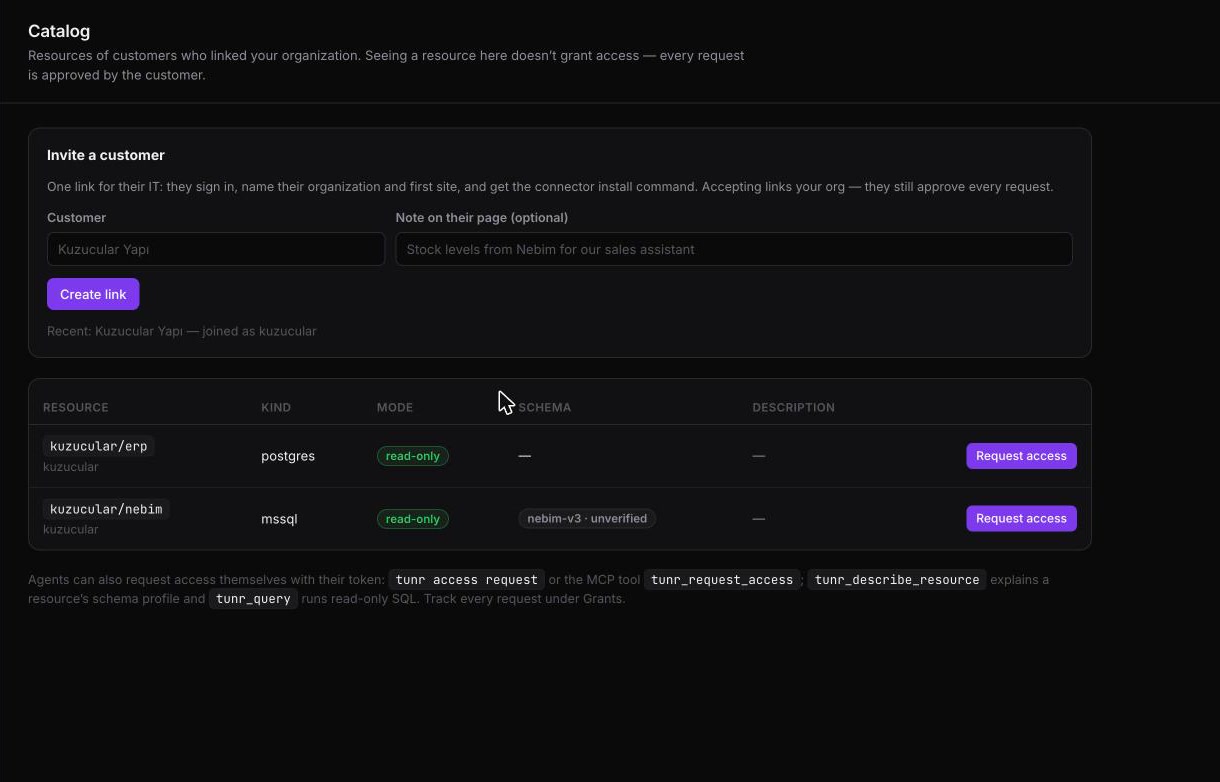
- The customer names what's reachableYou send one connect link; their IT signs in, installs the connector and adds resources like
acme/erp-db. Nothing is granted yet. - Your agent asks, with a reasonAn agent identity requests one resource, read-only, for a fixed time, with a reason the customer's approver reads.
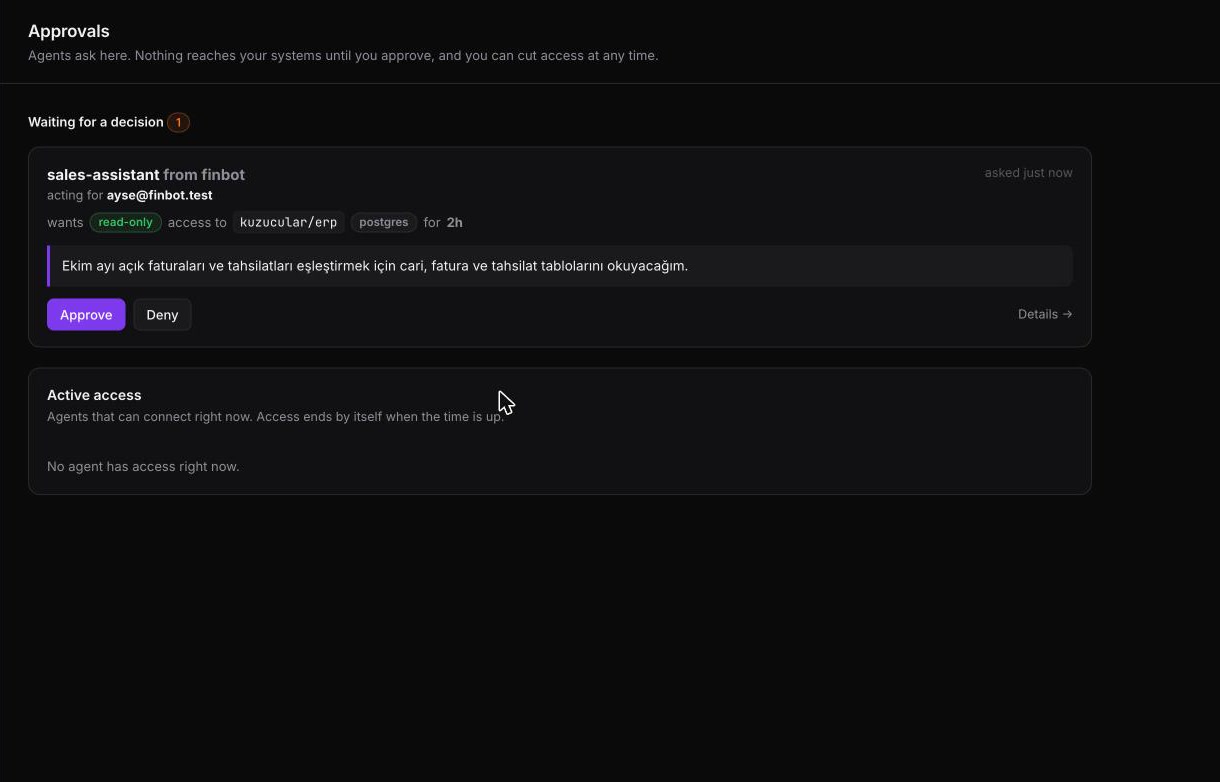
- A person approvesThe request shows up in the customer's approvals screen. Raw TCP (read-write) needs two different approvers.
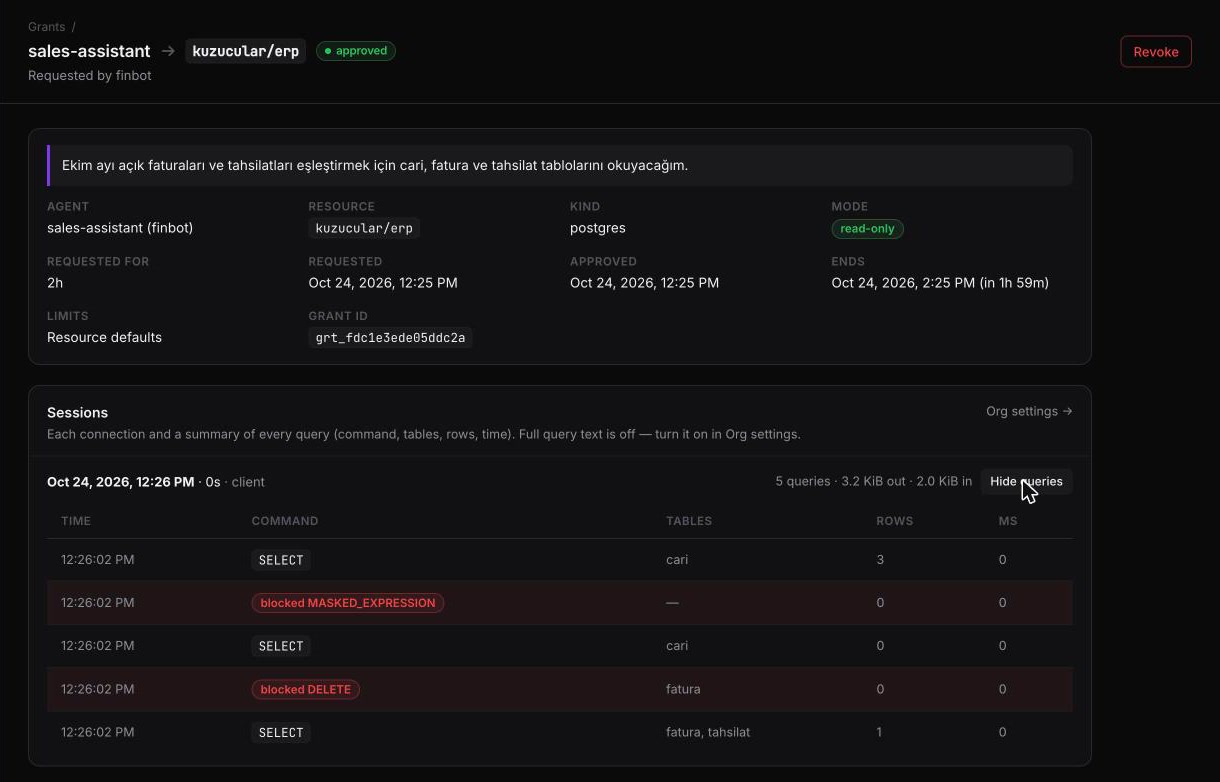
- The agent connects, on the recordIt gets a local port and a DSN. Every query is summarized in the customer's audit log. Access ends on its own.
Built for the ERP your customer actually runs
Nebim, Logo, Netsis — read-only, understood, on the record
Most small businesses keep their stock, invoices and accounts in an ERP on SQL Server. The bridge reaches it without handing your agent a login, and tells your agent what the tables mean.
Queries run by the connector
For an mssql resource the connector logs in with a read-only login (tunr connect mssql-role writes the T-SQL), runs each statement in a transaction it always rolls back, and refuses anything but SELECT/WITH. Your agent gets rows as JSON from tunr_query or a local POST /query — never a SQL Server login.
Your agent doesn't guess the schema
Profiles for Nebim V3, Logo Tiger/Go and Netsis describe the tables, the traps (Logo's CANCELLED = 0, ITEMS.ACTIVE 0 = active) and example queries. The customer's resource verify checks them against their real database; an unchecked profile is always marked unverified.
Tax numbers stay hidden
Mask columns in results — ******7919, a keyed hash, or NULL — with SQL Server's own Dynamic Data Masking or the connector's masking for Postgres. Expressions over a masked column are refused. Masking can't stop an agent testing a guess with WHERE, so truly secret columns stay out of the login.
Every agent acts for a person
Each request shows the agent and the person at the vendor it acts for. When that person leaves the vendor, their grants stop working at once.
One link to connect
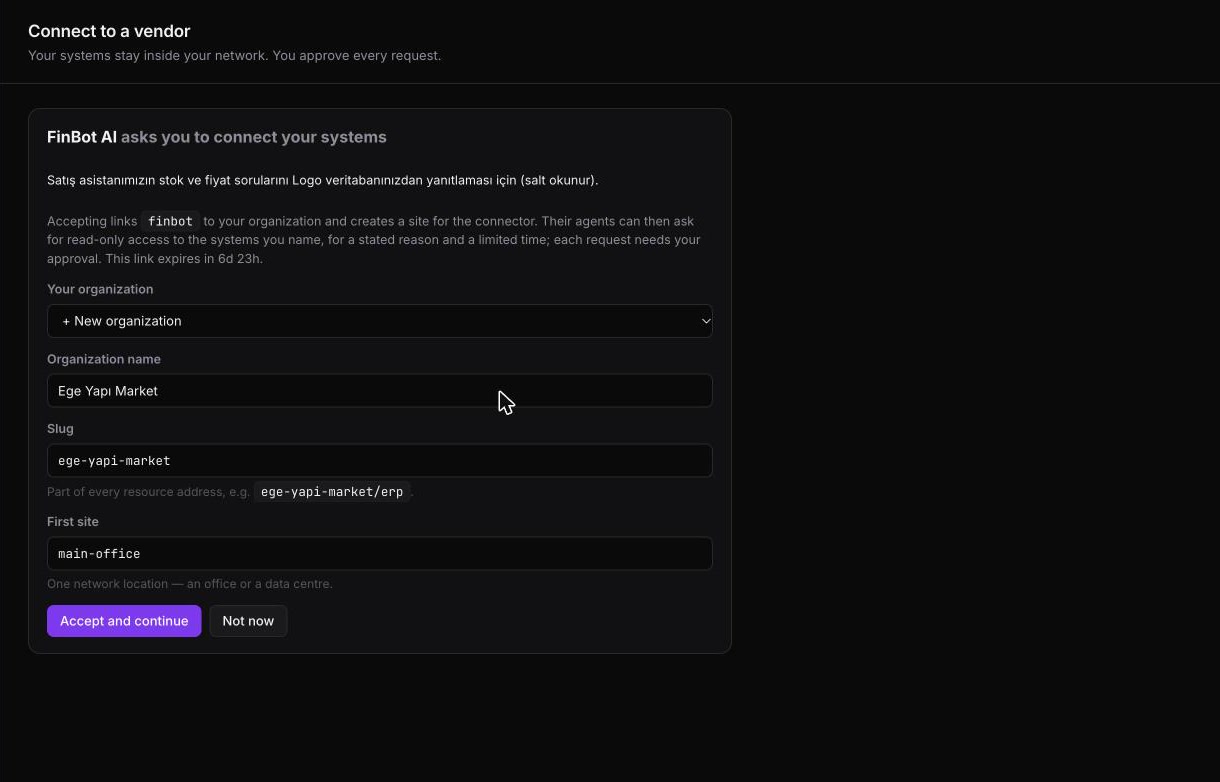
tunr invite create gives you a one-time link. The customer's IT signs in, names their site and gets the install command — no back-and-forth over org slugs. Accepting it approves nothing.
Answers before they ask
A guide for the customer's IT team, in Turkish and English: what runs, what the relay sees, how to cut access. And a brief for your coding agent.
For the customer's IT & security team
What it does on your network
One process on a machine you choose. Here's what it does, how each rule is enforced, and what it doesn't protect against.
Outbound only. No VPN.
The connector makes one outbound HTTPS/WebSocket connection to the relay. No inbound port is opened and the relay can't dial in. Resource addresses stay in the connector's local config; the relay and the vendor only ever see names like acme/erp-db.
Databases are read-only, in layers
- A login with
SELECTonly, generated bytunr connect pg-roleormssql-rolefor your DBA;resource verifytells you if it could write. - SQL Server: every statement runs in a transaction that is rolled back, behind a T-SQL allow-list (
SELECT/WITHonly). - Every session starts with
default_transaction_read_only=onand a 30 s statement timeout. - A statement classifier refuses writes, DDL,
COPY, function-call messages, row locks and side-effect functions. Refusals return SQLSTATE42501. - Optional per-resource limits on rows, bytes and queries per second.
Nothing flows until you approve
Default deny. A grant is one agent × one resource × one mode × a fixed time, with the vendor's reason. It expires on its own; you set the longest allowed window (8 h by default, 1–24 h). Raw TCP can't be made read-only, so it needs a read-write grant approved by two different people.
Agents never see a password
The connector logs in to your database itself, from its own secret store (OS keychain, or 0600 files on a headless server). The agent's DSN holds a random per-process secret that only unlocks its own local port.
Cut access in one click
Revoke closes that grant's open connections on both sides (about 4 ms in our end-to-end tests). Cut all access revokes every grant on a site. On the connector machine, tunr connect kill stops everything locally, even without the relay.
Everything is on the record
Grant requests, approvals, denials, revocations and expiries; every session with byte counts; a summary of every query (command, tables, rows, duration, blocked). Export as CSV or JSON. Full query text is stored only if you turn it on. Signed webhooks for grant events.
End-to-end TLS to your connector
Streams run TLS 1.3 between the vendor's tunr access and your connector, pinned to the connector's certificate (no CA), so the relay forwards ciphertext. Give vendors the fingerprint from tunr connect status so they can check it.
A hardened service
tunr connect install sets up a systemd unit with ProtectSystem=strict, NoNewPrivileges, private /tmp and devices. Health check for your monitoring: --health-addr serves /healthz.
One connector, every vendor
Allow a vendor by its org slug and it can see your resource names and ask. The next AI vendor is an approval away, not another on-prem install. Every database query on the relay is filtered by organization.
What the bridge does not protect against
- An actively compromised relay. The relay signs the short-lived grant tokens and tells the vendor which connector certificate to expect, so an attacker in control of it could mint grants or substitute a certificate. Checking the fingerprint out of band catches the second; approver-signed grants are planned. Self-hosting the relay removes the third party.
- A compromised connector machine. It holds the database credential and can reach the targets you configured. Run it on a machine you maintain like any other server.
- What a vendor does with data it was allowed to read. Grants limit what, how much and for how long. After that it's a contract matter; the audit log is your evidence.
- Guessing a masked value. Masking hides values in results; an agent allowed to read a table can still test a guess with
WHERE. Leave columns an agent must never learn out of the database login. - Query text reaching the relay. The connector sends per-query summaries, including the statement text, to the relay for your audit log. The relay stores the text only if you turn that on.
Quick start Preview
From zero to a first query
Install the CLI, open the dashboard, and follow along. Full guides: vendor · customer.
Vendor: your agent
In the dashboard, create a Vendor org (e.g. finbot) and an agent identity per agent. Customers see its name. Then:
# agent token: from the dashboard, or
$ export TUNR_AGENT_TOKEN=$(tunr agent token \
    invoice-reconciler --org finbot --ttl 24h)
$ export TUNR_RELAY_URL=https://bridge.tunr.sh

# resources you may request
$ tunr catalog
$ tunr access request acme/erp-db --ttl 2h \
    --reason "Reconcile October invoices" --wait 15m
$ tunr access acme/erp-db --port 15432
postgresql://agent:…@127.0.0.1:15432/db?sslmode=disable
- Write the reason for a person: what you'll read and why.
- Writes fail with SQLSTATE
42501. Respect row and rate limits withLIMITandWHERE. - Compare the connector fingerprint the customer gave you;
--require-e2erefuses connectors too old for end-to-end TLS. - A closed connection means the grant ended or was revoked: ask again, don't retry blindly.
From an agent framework (MCP)
{"mcpServers": {"tunr": {"command": "tunr", "args": ["mcp"],
  "env": {"TUNR_AGENT_TOKEN": "…",
          "TUNR_RELAY_URL": "https://bridge.tunr.sh"}}}}
tunr_list_resourcestunr_request_accesstunr_access_statustunr_describe_resourcetunr_querytunr_open_accesstunr_close_access
Customer: your IT team
In the dashboard, create a Customer org (e.g. acme), add approvers under Members, then Sites → Add a site. The dashboard shows these commands with your token and the relay key filled in. Plan on 10–15 minutes.
$ sudo tunr connect --relay https://bridge.tunr.sh \
    --site istanbul-office --relay-key ed25519:… \
    --token-stdin --secret-store file --setup-only
$ sudo tunr connect resource add erp --kind mssql \
    --target 10.0.0.7:1433 --database TIGER --profile logo-tiger
$ sudo tunr connect mssql-role --database TIGER \
    --resource erp > mssql-role.sql
# your DBA, once:
$ sqlcmd -S 10.0.0.7 -U sa -i mssql-role.sql
$ sudo tunr connect resource verify erp
$ sudo tunr connect install
$ sudo tunr connect status   # fingerprint
- Vendors → Allow a vendor with their org slug. They can see names and ask; nothing is granted.
- Approve or deny under Approvals; watch and export under Activity.
sudo tunr connect killstops everything locally;tunr connect resumeundoes it.
The other two directions
Show it out. Keep it up.
The bridge gets your agent to the data. The same relay and CLI cover the rest of the job: how the customer sees what you built before it goes live, where it runs after, and where the agent itself runs.
Show it before it ships Free
Walk the customer through what you built while it still runs on your laptop: a public HTTPS link in seconds, WebSockets and hot reload included.
- For demos:
--demoanswers writes without touching your app,--freezeserves the last good page if your server crashes,--inject-widgetcollects their feedback. - Password, bearer token, IP allow-list, TTL and QR code: one flag each.
- Raw TCP/UDP/TLS tunnels are experimental and not end-to-end encrypted; the bridge is the way to reach customer systems.
Ship what it built Preview
The stock dashboard or the reconciliation report your agent builds from the customer's ERP is a small app. Host it with one command, or one MCP call from the agent itself.
- Builds Node, Python, Go and more (or your
Dockerfile); each app in its own gVisor sandbox. - Idle apps sleep and wake on the next request (~150 ms p50).
- Over MCP:
tunr_deploy,tunr_app_logs,tunr_list_apps.
Run the agent here Early access
A job that reconciles invoices every night doesn't need its own server. tunr hosts the agent next to the bridge, private by default.
- Woken by cron or signed webhooks (
X-Tunr-Trigger-Signature, HMAC-SHA256); not reachable from a browser. - Its agent identity is issued automatically: hourly tokens, no long-lived secret in the container.
- gVisor sandbox with CPU and memory limits, and a
/datavolume that survives restarts.
Off on tunr.sh until resource quotas land · Ask for early access →
Pricing
Simple, transparent pricing
Every limit below is enforced by the relay. Upgrade when you need more.
- ✓ Deployed apps 3 · sleep when idle
- ✓ App memory 256 MB
- ✓ Deploys 20 / day
- ✓ Tunnels No time limit · 2 at once
- ✓ Tunnel URLs Random subdomain
- ✕ Reserved subdomains —
- ✓ Deployed apps 25 · sleep when idle
- ✓ App memory 512 MB
- ✓ Deploys 200 / day
- ✓ Tunnels No time limit · 10 at once
- ✓ Reserved subdomains myapp.tunr.sh
- ✓ Request rate 10× Free
Agent Bridge is in preview and isn't part of the Free or Pro limits. Pricing will be published before it leaves preview. Talk to us.
FAQ
Questions a security review will ask
Is tunr Bridge a VPN?
No. The customer runs one connector that only makes an outbound HTTPS/WebSocket connection. It exposes named resources, not a network, and nothing flows until the customer approves a grant for one agent, one resource and a fixed time window.
Can the agent write to our database?
Not to Postgres or SQL Server. The connector logs in with a SELECT-only login (pg-role / mssql-role), and tunr connect resource verify tells you if that login could write. Postgres sessions start read-only with a 30-second statement timeout; on SQL Server every statement runs in a transaction the connector rolls back. A statement classifier refuses writes, DDL and other side effects in both. Raw TCP resources cannot be made read-only, so they need a read-write grant approved by two different people.
Can tunr read our data?
The data stream is TLS 1.3 end to end between the vendor's tunr access and your connector, pinned to the connector's certificate, so the relay forwards ciphertext. The relay does receive per-query summaries for your audit log and signs the grant tokens, so an actively compromised relay is outside what the bridge protects against. You can verify the connector fingerprint out of band. Details and limits.
How fast can we cut access?
Revoking a grant closes its open connections on both sides; in tunr's end-to-end tests that took about 4 ms. Cut all access revokes every grant on a site, and tunr connect kill stops the connector locally even without the relay.
Which systems can it reach?
PostgreSQL (read-only) and raw TCP (read-write, two approvers) today. MySQL, MSSQL and HTTP resources are planned.
Can we run the relay ourselves?
Yes. The relay can be self-hosted, which takes tunr out of the path entirely. The relay is source-available under PolyForm Shield 1.0.0; the CLI, including the connector, is Apache-2.0. A self-hosted relay serves its own approvals portal at /portal/. During the preview, talk to us about setting it up.
Is it production-ready?
It's a preview. Each guarantee in the security overview is covered by automated tests, including end-to-end suites against a real PostgreSQL with the agent and the customer on separate networks. It has not had an independent penetration test yet. Read the security overview; report vulnerabilities to [email protected].
How is this different from tunr share?
tunr share makes a local port public for anyone with the link. The bridge is the opposite: nothing is public, every connection needs an approved grant for a named agent, and the customer sees and can cut every session.
Install the tunr CLI
One static binary for macOS, Linux and Windows: the Agent Bridge connector and tunr access, tunnels and deploy.
~ sudo tunr connect install # customer
~ tunr share --port 3000 # tunnel, no account
~ tunr login && tunr deploy # host an app